

A small voice-controlled speaker can seem like a simple purchase: ask for the weather, set a kitchen timer, play music or add something to a shopping list. But your choice also affects which calendar connects most naturally, which smart-home devices you can add later and how much setup is needed before the first useful command.
That is why it makes sense to choose the voice-assistant system before choosing the device. The three major options are Alexa, Google Home and Apple Home with Siri. None is right for every household. The best fit is usually the one that works comfortably with the phones, accounts and services you already use.
Start With What You Want a Voice Assistant to Do
A voice assistant earns its place by removing a small, repeated step. You might use it to set timers while cooking, add items to a list, hear tomorrow’s weather, start music or control a compatible lamp without opening an app.
Affiliate Disclosure: As an Amazon Associate, Simply Useful Tech earns from qualifying purchases.
If smart-home control appeals to you, start with one light or plug. That is enough to discover whether voice control suits your routine. Our guide to simple smart-home devices for a more comfortable, confident home offers practical ideas for building a modest setup.
Keep expectations realistic. Initial setup generally involves Wi-Fi, a platform account and a phone or tablet app. Calendars, music services and smart devices may also need to be linked through the app. Detailed information and account changes are often easier to handle on a screen.
Think of the assistant as a convenient shortcut rather than a household manager. Clear, simple requests usually make the most sense.
Choose the System That Matches What You Already Use
Before comparing speakers or displays, look at the devices and accounts already woven into your day.
| What you already use most | Platform to investigate first | Why it may fit |
|---|---|---|
| iPhone, iPad, Apple Watch and Apple services | Apple Home with Siri | It keeps home controls and voice features within the Apple ecosystem. |
| Android, Gmail, Google Calendar and Google services | Google Home | Your everyday information may already be held in Google accounts. |
| A household using both iPhones and Android phones | Alexa | The Alexa app is available for both iOS and Android, making it worth considering in a mixed-phone household. |
Ask three practical questions: Where is my calendar? Which phone or tablet will handle setup? Which smart devices do I already own or plan to buy?
If a relative is helping with setup, agree on who will own the main account. The person using the assistant should be able to reach essential settings, while the helper should know where the account and Wi-Fi details are stored. This avoids leaving a useful device dependent on one distant family member.
Alexa, Google Home and Apple Home/Siri: Practical Differences
All three platforms handle spoken requests, everyday information and compatible smart-home devices. The real difference is how neatly each one fits the rest of your digital life.
Alexa: worth considering for mixed-phone households
Amazon Echo devices use Alexa, and the Alexa app works with iOS and Android devices. That makes Alexa a sensible platform to investigate when household members use different types of phone.
The Amazon Echo Dot is one possible entry point once you have chosen Alexa. Before ordering a particular model, confirm its current setup requirements and support for the music services, calendars and smart-home products you intend to use. Features can differ between models and regions.
Google Home: a logical place to start for Google users
If Gmail, Google Calendar and an Android phone are central to your day, Google Home is the natural system to investigate first. Check how your particular account, calendar and music service connect, as well as support for any smart-home devices you already own.
Google’s assistant branding and features are changing, and availability may vary by device and country. Buy for the functions officially supported now rather than for a promised or partly released AI feature.
Apple Home with Siri: a close fit for Apple households
If your home already revolves around an iPhone, iPad or Apple Watch, Apple Home with Siri may involve fewer unfamiliar accounts and apps. Even so, compatibility is not automatic. Confirm the current setup-device requirements and check every planned smart-home accessory for Apple Home support in your region.
Speaker or Screen: Which Suits the Room?
A speaker is usually enough for timers, reminders, weather, music, lists and simple smart-home commands. It takes up little space and keeps the interaction straightforward.
Worth considering: Amazon Echo Dot
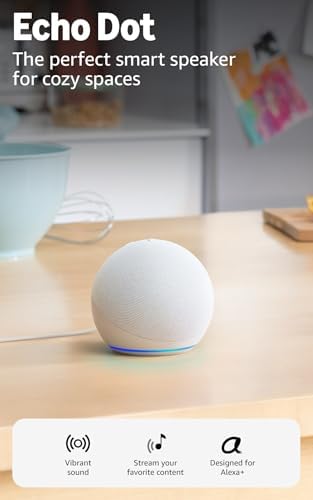
- Your favorite music and content – Play music, audiobooks, and podcasts from Amazon Music, Apple Music, Spotify and other…
- Alexa is happy to help – Ask Alexa for weather updates and to set hands-free timers, get answers to your questions and e…
- Keep your home comfortable – Control compatible smart home devices with your voice and routines triggered by built-in mo…
A smart display adds visible information, which may help with calendars, timers, recipes or lists. It also adds menus and another screen to manage. Choose according to the room and task rather than assuming a display is automatically better.
There is also a free option: try the voice controls already on your phone for a week. If you repeatedly wish you could speak from across the room, or want something everyone at home can use, a separate speaker or display may be worthwhile.
Check Setup and Wi-Fi Before You Order
A voice assistant normally needs reliable home Wi-Fi, the relevant platform account and a compatible phone or tablet for setup. Before buying:
- Choose the phone or tablet that will handle setup.
- Check that it can run the platform’s current app.
- Confirm that you can sign in to the correct Amazon, Google or Apple account.
- Find the Wi-Fi password and choose a spot with a reliable signal.
- Set up one everyday task before adding extra services or devices.
A simple setup becomes frustrating quickly if the speaker is linked to the wrong calendar or an account nobody can manage.
Make Sure Your Smart-Home Devices Work Together
Never assume that “smart” means compatible. For each light, plug, thermostat or doorbell, look for clear support for your chosen platform. Check the manufacturer’s current information rather than relying only on a retailer’s filters.
You may also see the term Matter. Matter is a shared smart-home standard designed to help compatible products work across multiple platforms. It is useful, but it does not guarantee that every feature will behave identically on every system. Check the exact functions you care about.
Start with one useful product and test the commands you will actually say. For more ideas, see our roundup of simple smart-home devices for everyday confidence.

Privacy Settings to Review on Day One
Because these devices contain microphones, privacy belongs in the buying decision. Settings and names vary between platforms, but these are the main controls to find in the companion app:
- Microphone mute: Learn how to disable the microphone on the device itself.
- Voice history: Check whether stored recordings or transcripts can be reviewed, deleted or set to expire automatically.
- Personal results: Decide whether calendar or account information should be spoken when other people are nearby.
- Household access: Review who can use connected services and home controls.
- Purchases and payments: Disable or protect voice purchasing if the platform offers it and you do not need it.
These controls can change, so review the current options during setup rather than relying on an old guide.
Costs and Limitations That Can Surprise Buyers
The speaker or display may not be the only cost. Music and video services can require subscriptions, while smart-home control requires compatible accessories. Advanced assistant features may also be optional, restricted to certain devices or unavailable in some regions. Check what is included before paying for anything extra.
You may also come across routines: groups of actions started by a phrase, time or event. For example, “good night” might turn off compatible lights and start an alarm. Routines become more useful as you add devices; with one speaker and one light, individual commands may be clearer.
Voice assistants rely on internet access, linked accounts, compatible products and understandable requests. They are not medical-alert devices or emergency services, and they should not replace contacting emergency help.
A Simple Before-You-Buy Checklist
- Write down the three tasks you want to use most often.
- Choose the platform that best matches your phone, calendar and accounts.
- Decide whether you need a speaker, a display or just your phone.
- Confirm your Wi-Fi, setup device and account access.
- Check every existing or planned accessory for compatibility.
- Review possible subscription and accessory costs.
- Plan to check privacy and personal-results settings during setup.
- Begin with one useful task or connected device.
Final Verdict
For voice assistants for seniors, the smartest purchase is rarely the device with the longest feature list. Choose the ecosystem that fits your existing phone and services, verify setup and compatibility, and start with one repeated task you would genuinely like to make easier.
Still deciding? Compare the product details, compatibility, and current Amazon listing before buying.